A newer driver package is not automatically useful for a working configuration. Version numbers and dates need context, and a change can introduce a regression as well as address a problem. Compare the purpose and affected requirements before deciding to leave the current state alone. That is not advice to ignore a relevant security advisory, an operating-system requirement or an administrator’s policy. This guide explains how to make the distinction and prepare for a justified change without treating maintenance as a race.
Why Stability Outweighs Version Numbers
Modern hardware operates through complex software interfaces where stability is the primary indicator of success. A driver that manages current hardware tasks without communication errors or resource conflicts is performing its role effectively. Chasing the latest release often results in regression, where newer code paths may not be as finely tuned for specific older hardware revisions as the mature, current version already installed on the local system.
System performance degradation frequently occurs when users replace functional code with experimental or unnecessary revisions. By deciding to retain a known-good configuration, you eliminate the risk of introducing latent bugs that typically accompany rapid development cycles. Observation of a stable device environment confirms that the current state provides the necessary overhead for the operating system to manage memory and input-output operations without overhead or unexpected hardware interrupts.
Identifying Genuine Needs for Driver Modification
Drivers only require intervention when clear, documented objective criteria arise, such as a security advisory confirming a vulnerability that impacts your specific hardware model or an OS upgrade that explicitly deprecates the existing driver model. These are administrative decisions based on policy or safety requirements. If your hardware lacks features provided in a specific newer package that are critical for your workflow, that constitutes a valid, objective reason for testing a replacement.
When evaluating a potential change, compare your current hardware revision against the target range covered by the release notes. If the release documentation does not mention your specific device ID, the package will likely not provide any benefit and could cause a misconfiguration. Relying on concrete evidence rather than automated update prompts prevents the common cycle of breaking perfectly serviceable hardware through indiscriminate software changes, keeping the registry and driver store clean.
Practical Actions for Driver Assessment
Conducting a thorough assessment before initiating any changes helps avoid unnecessary system instability. Compare the observed state with the relevant requirements before deciding whether there is a concrete reason to change it. This disciplined approach requires identifying the specific hardware ID currently in use and verifying if the release notes for a newer package explicitly resolve a known, occurring issue or address a relevant, verified security requirement for your machine.
When you decide that a change is unavoidable due to documented requirements, you must first prepare a recovery pathway. This involves knowing exactly how to revert to the previous state should the new version fail to initialize properly. Preparation identifies risks and recovery options; it does not make the action universally safe.
- Open the hardware management console to view the list of installed components and their current version numbers.
- Right-click the target device and select the properties menu to verify the hardware ID and current driver date.
- Cross-reference the current version with the release notes to confirm if any critical security or compatibility requirement exists.
- Create a system state snapshot or recovery point before modifying any driver files to ensure a rollback path.
- If a relevant requirement justifies a change, read the matching package’s documented procedure and prepare recovery first. Uninstalling the current package is not a universal prerequisite and a restart is not proof of a clean state.
Risks of Frequent Driver Interference
Every driver update involves replacing existing binary modules that have been tested through extended usage periods. Frequent interference disrupts this maturity cycle, often triggering errors related to invalid registry entries or incomplete package removal. The cumulative effect of unnecessary updates is a system configuration that is less predictable than one left in its original, stable state after the initial hardware setup phase.
Observers often note that hardware issues attributed to drivers are actually conflicts caused by layering multiple, competing update cycles. When you force an update without a specific functional trigger, you introduce variables that may conflict with other hardware-level components. Maintaining a consistent driver baseline minimizes these variables, ensuring the operating system manages hardware interaction with the highest degree of reliability and the lowest possible incidence of resource contention or communication failures.
Maintaining Long Term Hardware Reliability
Reliability is a product of environmental consistency rather than the constant pursuit of fresh software releases. Long-term hardware health depends on the underlying driver code being compatible with the OS architecture, which rarely changes for legacy or established hardware. By resisting the impulse to change what is not broken, you preserve the internal state of your system and keep performance predictable throughout the entire lifespan of the component.
Write down the reason for a proposed change and check whether it actually applies to this configuration. This mindset shifts the focus from managing updates to managing reliability. When hardware meets all functional expectations and the system remains secure according to documented standards, the most professional action is to leave the existing driver in place, allowing the hardware to continue operating exactly as it was designed to function.
Storage
Note these before you change anything
Useful facts to have to hand while reading about when leaving a working driver alone is sensible.
- A current backup before any change
- Controller mode in firmware: AHCI, RAID or NVMe
- Storage controller driver name and version
- Drive health shown by the maker's own diagnostics
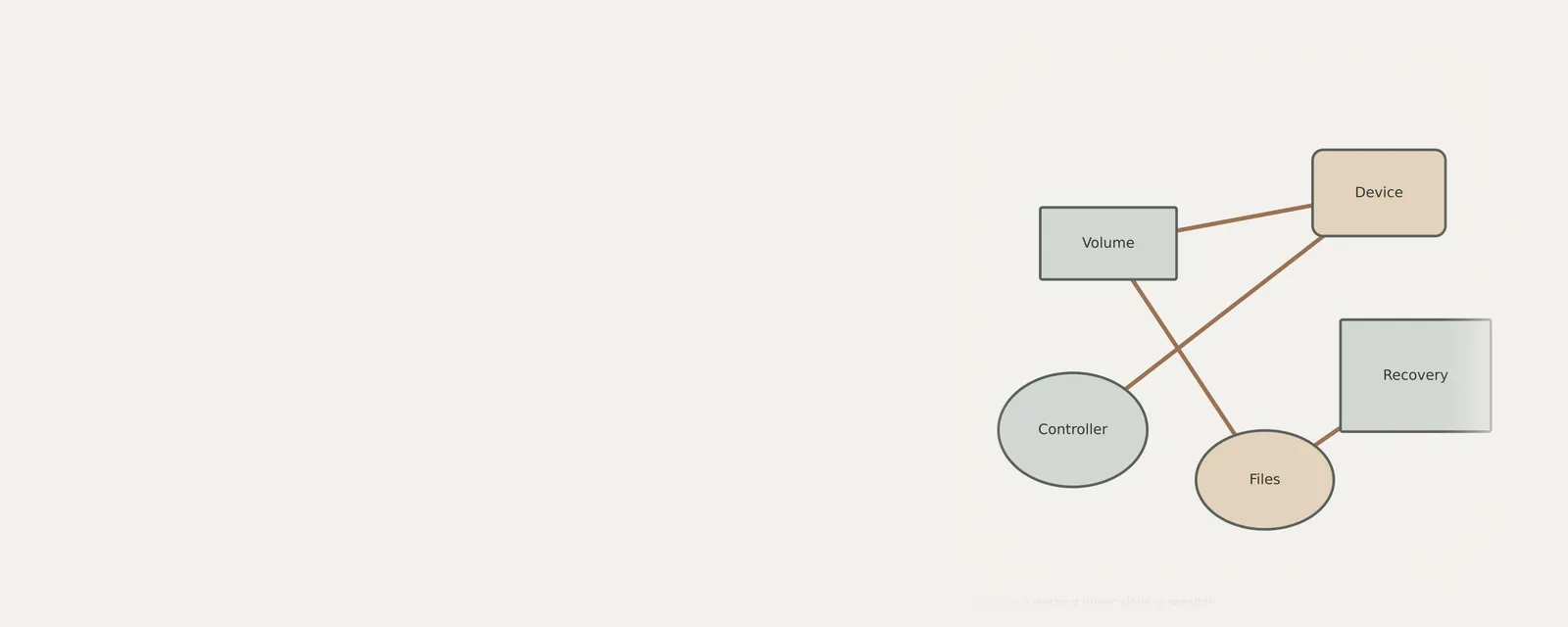
Storage: Reading and writing data
- File systemfiles and folders
- Storage stackvolumes and partitions
- Controller driverNVMe, AHCI or RAID
- Controlleron the board or a card
- DriveSSD or HDD
Frequently asked questions
Is there a performance boost from updating drivers frequently?
Rarely. Unless the release notes for a specific driver version document a direct performance improvement for your specific hardware model or resolve a known bottleneck, new versions are typically intended for hardware revisions you may not possess. Frequent updates often introduce more overhead and potential instability than actual tangible speed improvements.
When should I consider a driver update?
Only initiate a change if you encounter a persistent functional failure, if a security advisory explicitly lists your hardware as vulnerable, or if an operating system transition makes the current driver incompatible. If your device is functioning correctly, these criteria are usually not met, making updates unnecessary and potentially risky.
How do I ensure a safe way to revert changes?
Before performing any modification, create a system recovery point. This allows the OS to roll back the registry and driver files to a previous, functional state if the new version causes hardware errors. Always verify your recovery strategy is functional before altering any part of the existing driver stack.
Does leaving a driver alone impact system security?
Not necessarily. Security is maintained by monitoring hardware-specific advisories. If no advisory targets your device or current driver, leaving it alone is perfectly safe. Security relies on responding to documented threats, not on blindly installing every available software revision that arrives through a general maintenance notification channel.